> ## Documentation Index
> Fetch the complete documentation index at: https://openlayer.com/docs/llms.txt
> Use this file to discover all available pages before exploring further.
# Create API keys
> Issue, use, disable, and revoke the keys your apps send to the gateway
API keys are what your apps and teammates send with every request. They're separate from the
**admin key**, which only you use to sign in to the portal. Hand out API keys freely, but never
share the admin key or ship it in an app.
Every API key starts with `sk-olga-`. The gateway stores only a hash of it, so a key can't be
recovered after it's created. If one is lost or leaked, delete it and issue a new one.
## Create a key
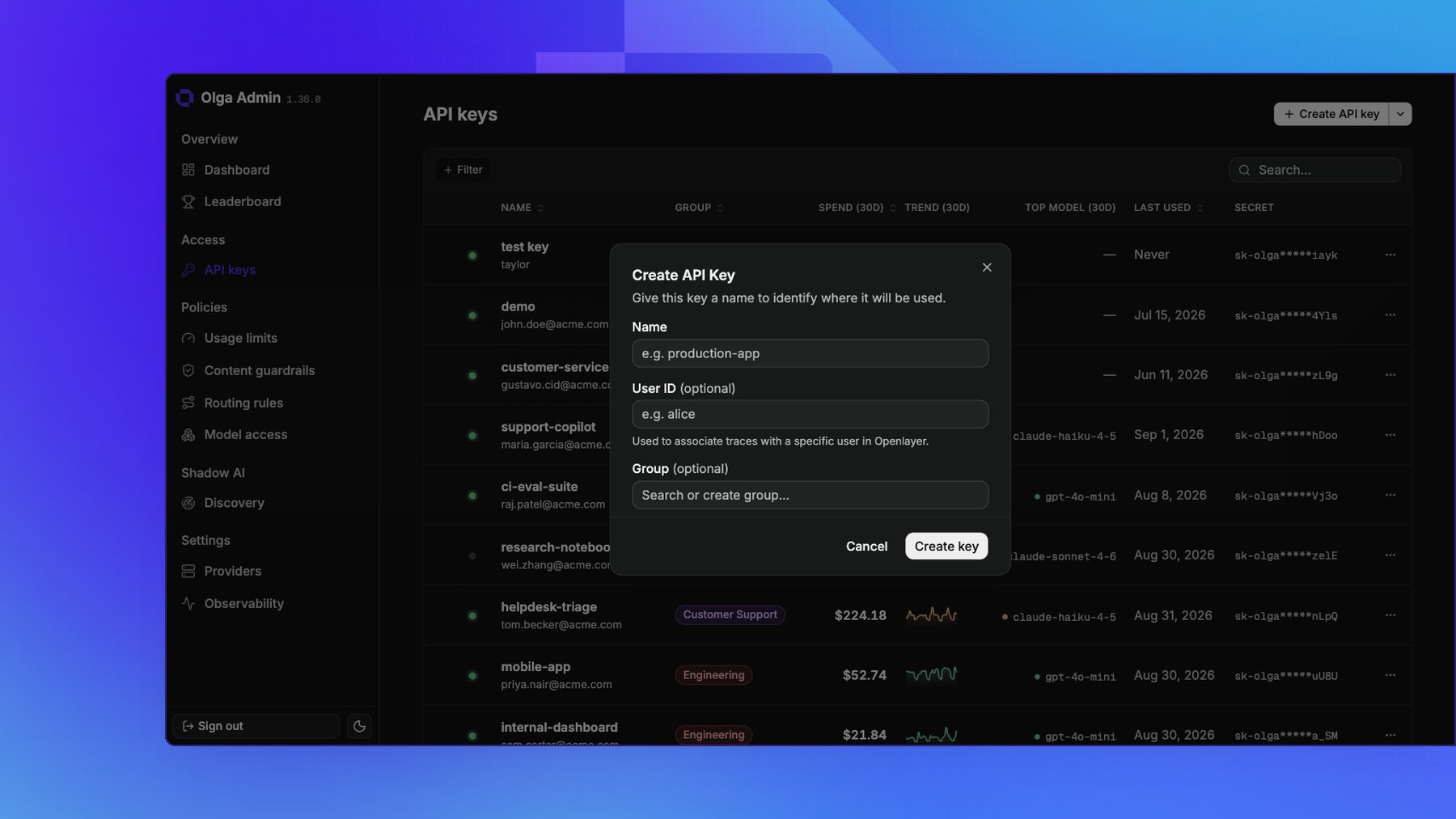
On the **API keys** page, create a key and fill in:
* **Name**: where the key will be used, such as `production-app`. Required.
* **User ID** (optional): associates this key's traces with a specific user in Openlayer. See [Observability](/docs/gateway/observability).
* **Group** (optional): groups the key so it shares a group's usage limits and guardrails. See [Groups](/docs/gateway/groups).
Copy the key when it appears. It's shown **only once**.
 ## Use a key
Send the key with each request, either as `Authorization: Bearer sk-olga-...` or as
`X-Api-Key: sk-olga-...`. Standard OpenAI and Anthropic SDKs send the `Authorization` header for
you, so pointing a client at the gateway is enough. See
[Make your first request](/docs/gateway/make-your-first-request).
## Rotate a key
**Rotate secret**, on a key's detail page, issues a new secret for an existing key. **Rotate** in the
key's row menu does the same thing. Everything except the secret is preserved: the
key keeps its name, user, group, enabled state, usage history, and every usage limit, guardrail, and
model access rule aimed at it.
The old secret stops working the moment you rotate, with no overlap window, so rotation is the
response to a leaked key rather than a scheduled key change. Update the app before or immediately
after rotating.
You can rotate a disabled key, which is what makes the incident path work: disable the key to stop
the traffic, rotate it, then re-enable it once the new secret is deployed.
## Disable or delete a key
* **Disable** turns a key off without removing it. Requests using it are rejected until you re-enable it. Use this to pause a key or investigate suspicious traffic.
* **Delete** removes the key for good. Requests using it return `401`, and it can't be restored.
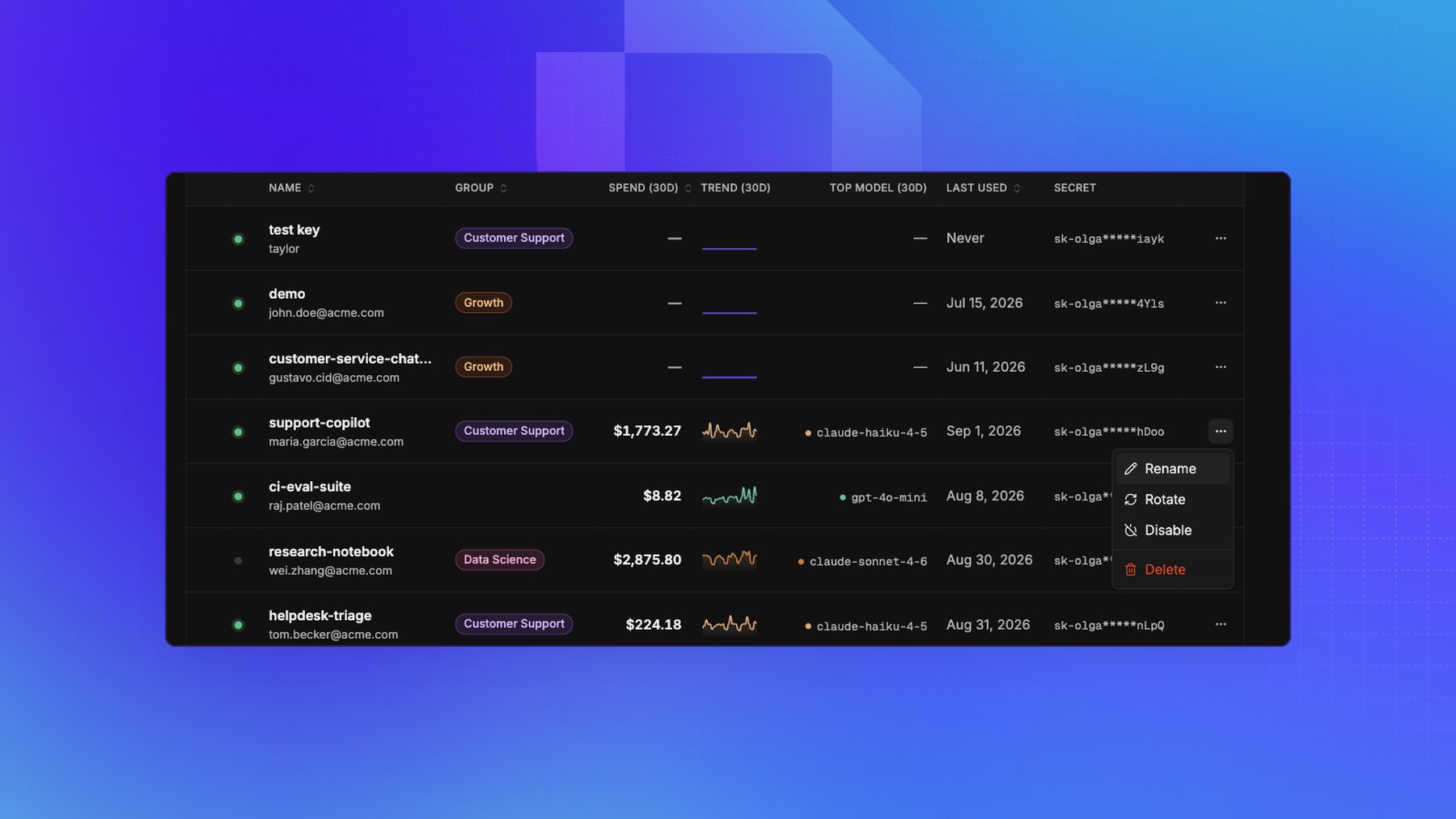
A key's row menu carries **Rename**, **Rotate**, **Disable**, and **Delete**. You can also select
several keys at once to disable, delete, or move them to a group.
## Use a key
Send the key with each request, either as `Authorization: Bearer sk-olga-...` or as
`X-Api-Key: sk-olga-...`. Standard OpenAI and Anthropic SDKs send the `Authorization` header for
you, so pointing a client at the gateway is enough. See
[Make your first request](/docs/gateway/make-your-first-request).
## Rotate a key
**Rotate secret**, on a key's detail page, issues a new secret for an existing key. **Rotate** in the
key's row menu does the same thing. Everything except the secret is preserved: the
key keeps its name, user, group, enabled state, usage history, and every usage limit, guardrail, and
model access rule aimed at it.
The old secret stops working the moment you rotate, with no overlap window, so rotation is the
response to a leaked key rather than a scheduled key change. Update the app before or immediately
after rotating.
You can rotate a disabled key, which is what makes the incident path work: disable the key to stop
the traffic, rotate it, then re-enable it once the new secret is deployed.
## Disable or delete a key
* **Disable** turns a key off without removing it. Requests using it are rejected until you re-enable it. Use this to pause a key or investigate suspicious traffic.
* **Delete** removes the key for good. Requests using it return `401`, and it can't be restored.
A key's row menu carries **Rename**, **Rotate**, **Disable**, and **Delete**. You can also select
several keys at once to disable, delete, or move them to a group.
 ## Track a key's usage
Open any key to see its requests, tokens, and estimated cost over time, plus how much of its traffic
was rerouted and what that saved. Each key's detail page also has a **Model access** section for the
rules that cover that key. See [Usage & cost](/docs/gateway/usage-and-cost) and
[Model access](/docs/gateway/model-access).
Everything on this page is also available on the gateway's admin API, so you
can automate key issuance and revocation.
This documentation is built and hosted on [Mintlify](https://mintlify.com), a developer documentation platform.
## Track a key's usage
Open any key to see its requests, tokens, and estimated cost over time, plus how much of its traffic
was rerouted and what that saved. Each key's detail page also has a **Model access** section for the
rules that cover that key. See [Usage & cost](/docs/gateway/usage-and-cost) and
[Model access](/docs/gateway/model-access).
Everything on this page is also available on the gateway's admin API, so you
can automate key issuance and revocation.
This documentation is built and hosted on [Mintlify](https://mintlify.com), a developer documentation platform.